Low-Voltage Security Wiring: Protecting Your Home the Right Way
Low-Voltage Security Wiring: Protecting Your Home the Right Way
Are you constantly worried about the security of your home? Do you find yourself double-checking locks and feeling uneasy when you're away? A comprehensive security system is a great first step, but it's only as good as its wiring. Proper low-voltage wiring is the backbone of any reliable home security setup, ensuring your cameras, sensors, and alarms function flawlessly when you need them most.
This article dives into the world of low-voltage wiring for security systems, providing you with the essential knowledge to safeguard your property. We'll explore everything from choosing the right cables and understanding voltage requirements to installation best practices and troubleshooting common issues. Whether you're a seasoned DIY enthusiast or just starting to explore the possibilities of smart home technology, this guide will empower you to make informed decisions and protect your home effectively.
Why Low-Voltage Wiring Matters for Security
Low-voltage wiring plays a crucial role in powering and connecting various components of your home security system. Unlike standard household electrical wiring (120V in North America), low-voltage systems operate at significantly lower voltage levels (typically 5V to 48V DC). This makes them safer to work with and ideal for powering sensitive electronic devices like security cameras, motion detectors, door/window sensors, and alarm systems.
Think of it like this: your home's electrical system is the main highway, while low-voltage wiring is the network of smaller roads that connect individual houses. These smaller roads, when well-maintained and properly planned, allow for efficient and reliable communication and power delivery between your security devices and the central control panel. Proper structured cabling ensures signal integrity, minimizing interference and maximizing the reliability of your security system. Neglecting this aspect can lead to false alarms, system failures, and ultimately, a compromised sense of security.
Planning Your Security System Wiring
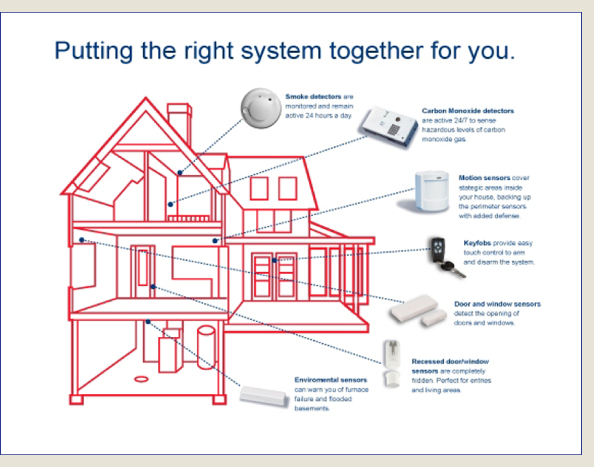
Before you start pulling wires, careful planning is essential. A well-thought-out plan will save you time, money, and frustration in the long run. Here's how to approach it: Identify your security needs: What areas of your home do you want to protect? Consider entry points, windows, and vulnerable areas. Determine the type of security devices you'll need (cameras, sensors, alarms, etc.) and their placement. Create a wiring diagram: Draw a detailed diagram of your home, marking the locations of all security devices and the path of the wiring runs. This will help you estimate the amount of cable you'll need and identify any potential obstacles. Choose the right cable: Selecting the appropriate cable type is crucial for optimal performance and safety. Common types used in security wiring include: CAT5e/CAT6 Ethernet cable: Ideal for IP-based security cameras, providing both power (Power over Ethernet - Po E) and data transmission.
Coaxial cable (RG6/RG59): Used for older analog security cameras.
Security system cable (typically 18/2 or 22/4): Used for connecting sensors, alarms, and other low-voltage devices. The numbers refer to the wire gauge and number of conductors. Plan for power: Determine how your security devices will be powered. Po E simplifies wiring for IP cameras, while other devices may require dedicated power supplies. Ensure the power supply has enough capacity to handle the combined power draw of all connected devices. Consider future expansion:Plan for future upgrades and additions to your security system. Running extra cables now will save you the hassle of rewiring later.
Step-by-Step: Installing Low-Voltage Security Wiring
Safety First: Always disconnect the power to the circuit you're working on before handling any wires. Use appropriate safety gear, including gloves and eye protection. If you are unsure about any aspect of the installation, consult a qualified electrician.
1.Run the cables: Following your wiring diagram, carefully run the cables from the control panel to each security device. Use cable ties or staples to secure the cables along the way, ensuring they are neatly organized and protected from damage.
2.Terminate the cables: At each end of the cable run, carefully strip the outer jacket and expose the individual wires. Use appropriate connectors (e.g., RJ45 connectors for Ethernet cables, BNC connectors for coaxial cables) to terminate the wires. Double-check the wiring diagram to ensure each wire is connected to the correct terminal.
3.Connect the devices: Connect the terminated cables to the appropriate terminals on the security devices (cameras, sensors, alarms, etc.). Ensure the connections are secure and properly insulated.
4.Test the system: Once all connections are made, carefully restore power to the circuit and test the security system. Verify that all devices are functioning correctly and that alarms are triggered when appropriate.
5.Cable Management Best Practices: Keeping your wiring organized is crucial for easy troubleshooting and maintenance. Use cable ties, labels, and junction boxes to keep your wiring neat and accessible. Avoid sharp bends in the cables, as this can damage the wires and degrade signal quality.
Troubleshooting Common Wiring Issues
Even with careful planning and installation, wiring issues can sometimes arise. Here are some common problems and how to troubleshoot them: No power to devices: Check the power supply to ensure it's functioning correctly. Verify that the voltage output matches the requirements of the connected devices. Inspect the wiring for any loose connections or damaged cables. Signal interference: If you're experiencing signal interference, try using shielded cables to reduce noise. Ensure that the cables are not running parallel to power lines or other sources of interference. False alarms: False alarms can be caused by a variety of factors, including faulty sensors, loose wiring connections, or environmental conditions. Check the sensor sensitivity settings and ensure that the wiring connections are secure. Camera image quality issues: Check your internet cabling. Ensure it hasn't degraded from weather exposure or animal interference. Replace cable if you see corrosion. Intermittent connectivity:This often points to a loose connection or damaged cable. Carefully inspect the wiring and connectors for any signs of damage or corrosion. Re-terminate the connections if necessary.
Choosing the Right Low-Voltage Cable
Selecting the correct cable is paramount for a reliable security system. Here's a closer look at the common options: CAT5e/CAT6 Ethernet Cable: These are the workhorses of modern IP-based security systems. CAT6 offers improved performance over CAT5e, especially for longer cable runs and higher bandwidth applications like high-resolution security cameras. Look for "plenum-rated" cable (CMP) if running through air handling spaces for fire safety. Coaxial Cable (RG6/RG59): While less common in modern systems, coaxial cable is still used for older analog cameras. RG6 offers better signal quality and is recommended for longer runs. Security System Cable (18/2, 22/4):This type of cable is specifically designed for connecting sensors and alarms. The gauge (18 or 22) indicates the wire thickness; lower gauge means thicker wire, suitable for longer runs and higher current loads. The number of conductors (2 or 4) indicates the number of individual wires within the cable.
Remember to always use cables that are rated for the intended application and environment.
Smart Home Systems Integration and Your Security Wiring
Modern security systems often integrate with smart home systems, allowing you to control your security devices remotely and automate security tasks. This integration typically relies on network wiring and a central hub that connects all your smart devices. When planning your security wiring, consider how it will integrate with your existing or future smart home system. This may involve running additional Ethernet cables or installing a dedicated smart home hub.
Maintenance and Long-Term Care
Proper maintenance is key to ensuring the long-term reliability of your security system wiring. Here are some tips: Regular Inspections: Periodically inspect your wiring for any signs of damage, wear, or corrosion. Pay close attention to exposed cables and connections. Cable Management: Keep your wiring organized and protected from damage. Use cable ties, labels, and junction boxes to maintain a neat and accessible wiring system. Testing: Regularly test your security system to ensure that all devices are functioning correctly. This will help you identify and address any potential issues before they become major problems. Professional Checkups: Consider having a qualified electrician inspect your security wiring periodically to identify any potential problems and ensure that the system is functioning optimally.
People Also Ask
Can I use wireless security cameras to avoid wiring? While wireless cameras offer convenience, they are generally less reliable than wired cameras due to potential signal interference and security vulnerabilities. If you prioritize reliability and security, wired cameras are the better choice. How much does it cost to install security wiring? The cost of installation can vary depending on the complexity of the system, the amount of wiring required, and the labor costs in your area. Get quotes from multiple qualified electricians to compare prices. Is it safe to DIY security wiring? While some aspects of security wiring can be done by DIY enthusiasts, it's important to have a solid understanding of electrical safety principles and wiring techniques. If you're unsure about any aspect of the installation, it's best to consult a qualified electrician.
Conclusion: Protecting Your Home with Confidence
Investing in proper low-voltage security wiring is a smart decision that will enhance the safety and security of your home. By understanding the principles of low-voltage wiring, planning your installation carefully, and following best practices for cable management and maintenance, you can create a reliable security system that protects your property and provides you with peace of mind. Remember to prioritize safety and consult with a qualified electrician if you have any doubts or concerns. With the right knowledge and preparation, you can confidently safeguard your home and loved ones.
Posting Komentar untuk "Low-Voltage Security Wiring: Protecting Your Home the Right Way"